Read the video transcript
- Sheets, Excel, your CRM. Almost everything takes CSV.
- Chat list is everyone you message; Saved contacts is your address book. Your own number stays out.
- Duplicates are already merged, so every number shows up once.
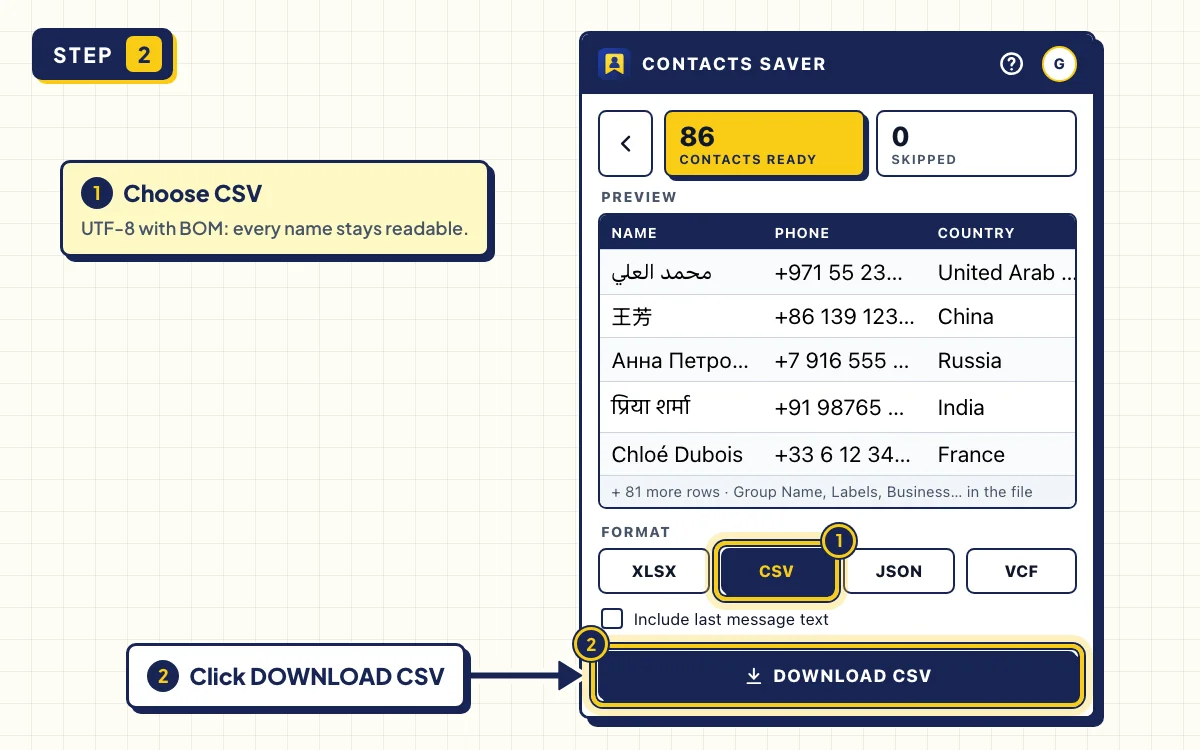
- UTF-8 with a BOM — so Arabic, Hindi and Chinese names stay intact.
- Contacts Saver. Free on the Chrome Web Store.
WhatsApp can't export your contact list by itself. To export WhatsApp contacts to CSV, use the CHATS tab in Contacts Saver. It turns everyone you chat with, or everyone in your address book, into one CSV file.
CSV is the format almost every tool accepts: Google Sheets, Excel, email tools and CRMs. Below you'll also see how to open the file without garbled names and how to map the columns in a CRM.
What you need
- A computer with Chrome or Edge, with WhatsApp Web logged in
- The free Contacts Saver extension
- Google Sheets, Excel or a CRM that imports CSV
Step-by-step instructions
- 1
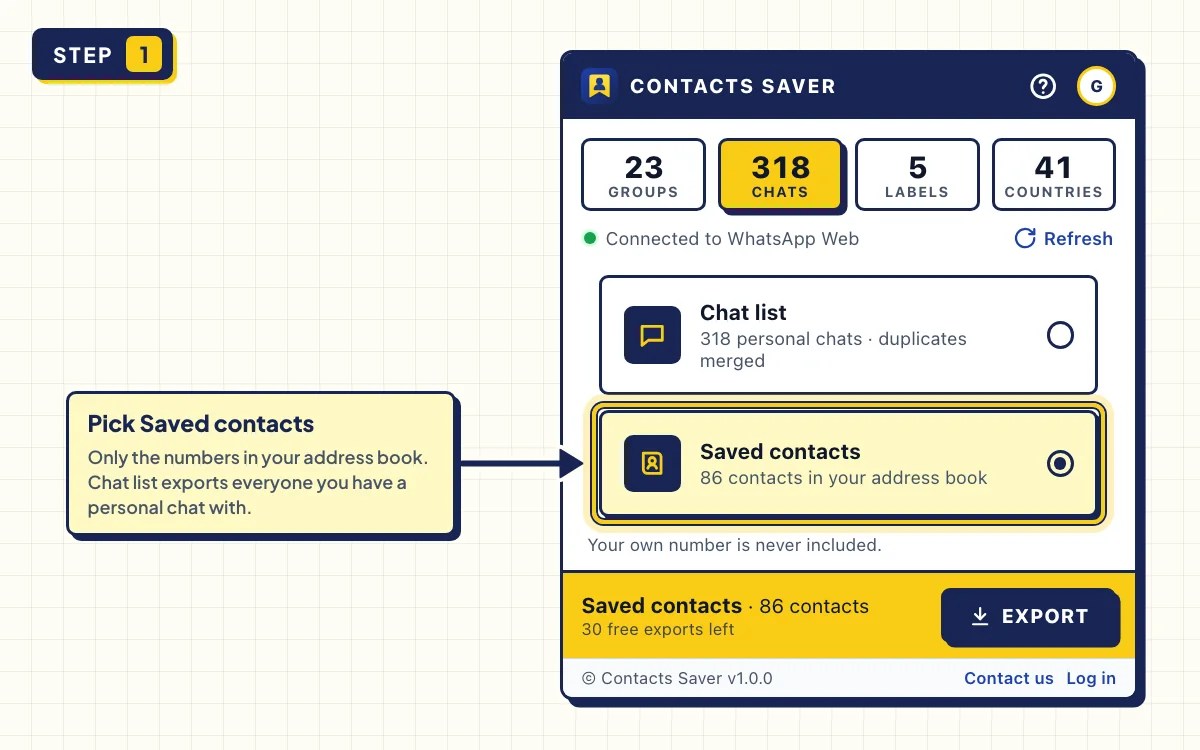
Open CHATS and pick a list
Open WhatsApp Web, click the Contacts Saver icon and go to the CHATS tab.
Chat list is everyone you have a personal chat with, saved or not. Saved contacts is only the numbers in your phone's address book. Group chats aren't part of either list.
Each option shows how many people it has. Your own number is never included.
- 2
Export and download the CSV
Click EXPORT. When CONTACTS READY appears, choose CSV under FORMAT and click DOWNLOAD CSV.
Duplicates are already merged, so each phone number appears once.
- 3
Open it in Google Sheets or Excel
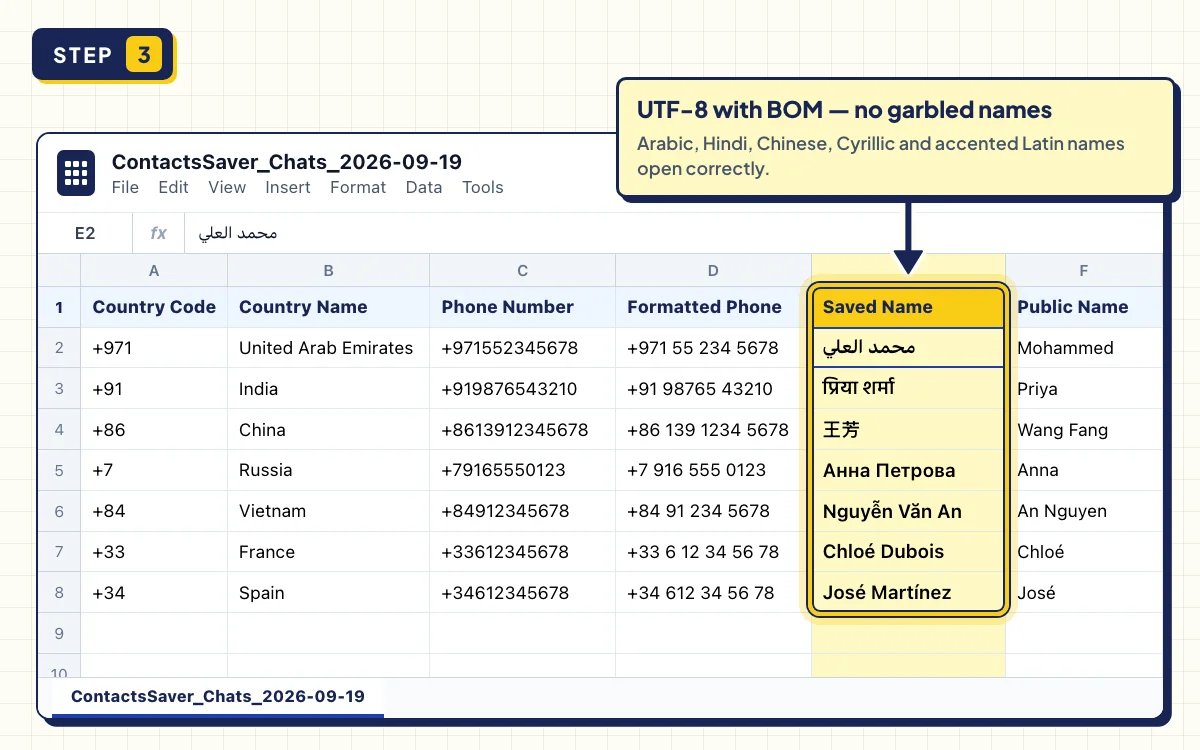
In Google Sheets, open a blank sheet, choose File → Import, upload the file and click Import data.
In Excel, just double-click the file. It's saved as UTF-8 with a BOM, a small marker that tells Excel the encoding, so Arabic, Hindi, Chinese and Cyrillic names display correctly.
- 4
Import it into your CRM
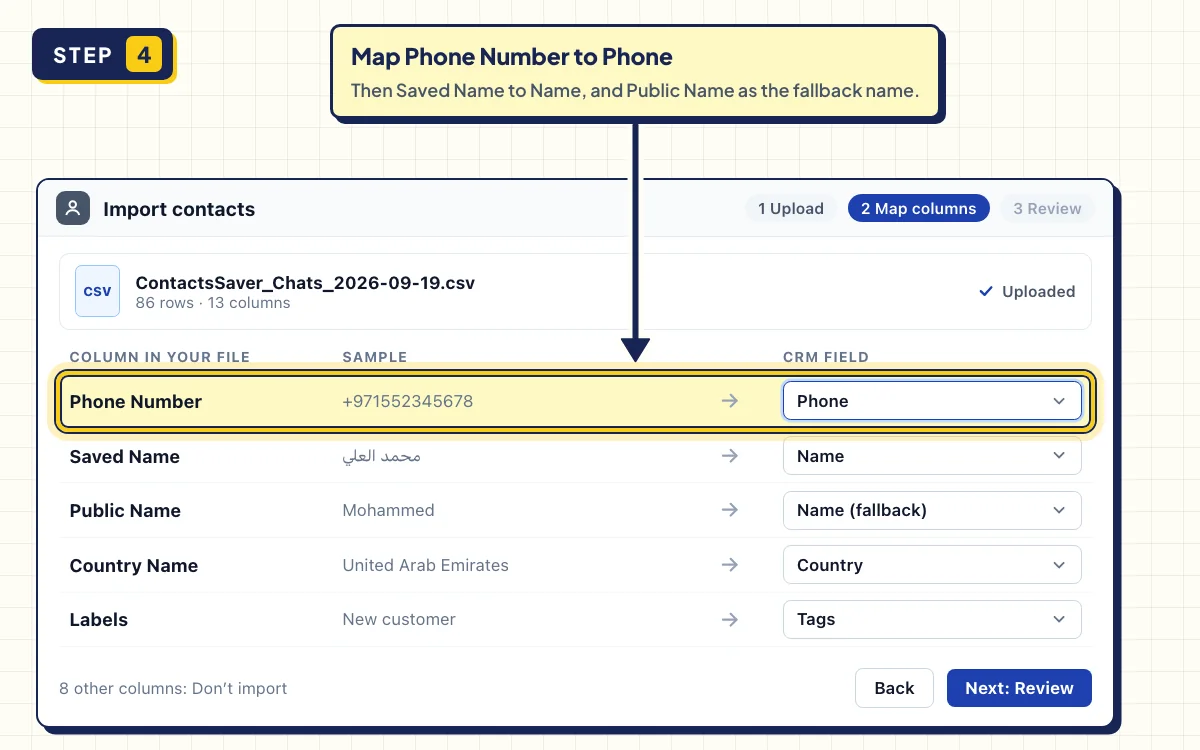
Use your CRM's CSV import. Map Phone Number to the phone field; it already includes the plus sign and country code, like +12125550147. Map Saved Name or Public Name to the name field.
Country Name helps you send leads to the right team, and Labels makes a good tag if you use WhatsApp Business.
Export WhatsApp contacts to CSV, Excel or JSON?
| Format | Pick it when |
|---|---|
| CSV | You import into a CRM, an email tool or Google Sheets. Every value is in quotes, so names with commas stay in one column. |
| XLSX | You want to sort and filter in Excel right away. Phone numbers stay as text. |
| JSON | You're a developer. It's a list of objects, one per contact, with the same field names as the columns. |
| VCF | You want the contacts on your phone. |
For the phone route, see How to Save WhatsApp Group Contacts to Your Phone.
Troubleshooting
- Names look garbled. An old import screen ignored the BOM. Double-click the file instead, or choose UTF-8 as the file origin when you import.
- The plus sign disappears, or numbers show as 1.21E+10. The spreadsheet read the number as math. In Google Sheets, untick Convert text to numbers, dates, and formulas when you import. In Excel, use the XLSX download instead.
- Some contacts are SKIPPED. WhatsApp didn't share their phone number, often because of privacy settings. They're counted, not added as broken rows.
- The popup says WhatsApp is still syncing. Wait for your chats to load, then click Refresh.
- A long export. Keep the popup open. STOP keeps everything collected so far.
Tips
- Export Saved contacts now and then to keep a spreadsheet backup of your address book.
- Include last message text is off by default, so private messages stay out of the file. Tick it only if you need it.
- Need group members, not chats? Follow How to Export WhatsApp Group Contacts to Excel and pick CSV at the end.
Get your WhatsApp contacts into a clean CSV
Install Contacts Saver for free. 30 full exports in every format, and your contacts never leave your browser.
Frequently asked questions
How do I export my contacts as a CSV file?
On WhatsApp Web, click Contacts Saver, open CHATS, pick a list and click EXPORT. Then choose CSV and download. The file opens in Google Sheets, Excel and most CRMs.
How can I export all my WhatsApp contacts?
Use Saved contacts for your whole address book, or Chat list for everyone you've chatted with. For group members you've never chatted with, export their groups on the GROUPS tab.
Does the CSV include group chats?
No. The CHATS tab covers personal chats only. Use the GROUPS tab for group members.